• Trends
  • Ranking
  • My Channel
Pricing
Log in
Pricing

내 유튜브 채널을 연결하면 이렇게 보여요

유튜브 스튜디오를 따로 열지 않아도, 내 채널의 조회수·시청 시간·노출 클릭률·구독자 증감을 한 화면에서 봅니다. 채널을 여러 개 운영하면 한 곳에서 나란히 놓고 볼 수 있어요.
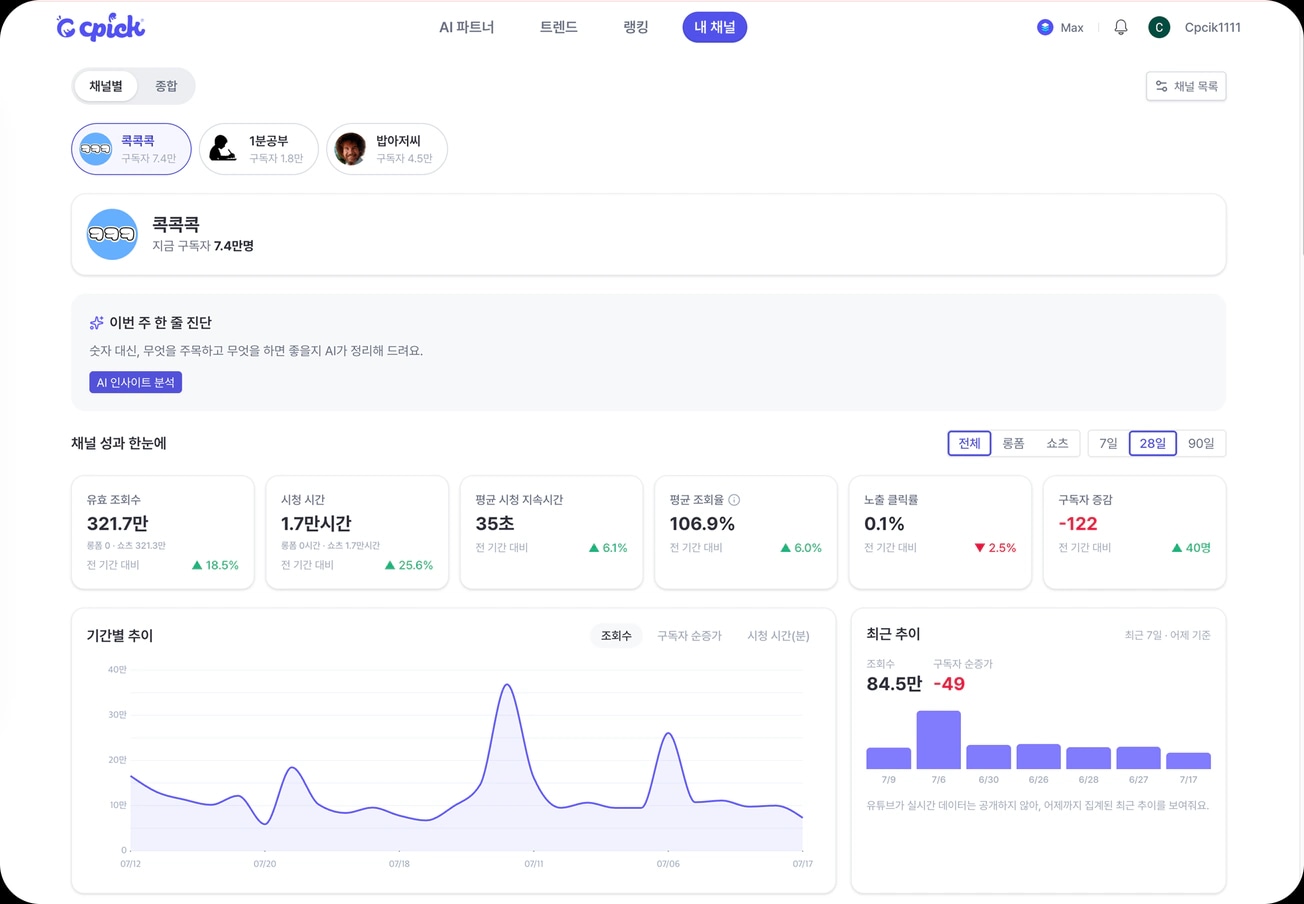
크픽 내 채널 화면 예시 — 조회수·시청 시간·노출 클릭률·구독자 증감과 이번 주 한 줄 진단
  • 조회수와 시청 시간롱폼과 쇼츠를 나눠서, 지난 기간과 얼마나 달라졌는지 함께 봅니다.
  • 노출 클릭률썸네일이 몇 번 보였고 그중 몇 명이 눌렀는지 확인합니다.
  • 구독자 증감늘어난 수와 빠져나간 수를 나눠서 봅니다.
  • 이번 주 한 줄 진단숫자 대신, 지금 무엇을 하면 좋을지 CPICK AI 가 정리해 드려요.
KakaoTalk ChannelFAQContact usNotices
Privacy PolicyTerms of ServiceRefund PolicyOperating Policy

CEO Kyunghan Kang | Company Creator Brandlab Inc. | Business Reg. No. 378-81-03248 | Mail-order Reg. No. 2026-서울강서-0426

Address #1111–1112, Bldg C, Doosan The Land Park, 161-8 Magokjungang-ro, Gangseo-gu, Seoul, Korea | Email help@brandlabinc.com

Phone 02-6305-4182 | Privacy Officer Chanwoo Lee

© 2026 Creator Brandlab Inc. All rights reserved.

KakaoTalk ChannelFAQContact usNotices
Privacy PolicyTerms of ServiceRefund PolicyOperating Policy

CEO Kyunghan Kang | Company Creator Brandlab Inc. | Business Reg. No. 378-81-03248 | Mail-order Reg. No. 2026-서울강서-0426

Address #1111–1112, Bldg C, Doosan The Land Park, 161-8 Magokjungang-ro, Gangseo-gu, Seoul, Korea | Email help@brandlabinc.com

Phone 02-6305-4182 | Privacy Officer Chanwoo Lee

© 2026 Creator Brandlab Inc. All rights reserved.